My Productivity Setup
When I am home, I have a 3 screen setup. 2 1440p 27” screens and one small portable (and touch) 1080p 15” screen. Usually Setup like so:
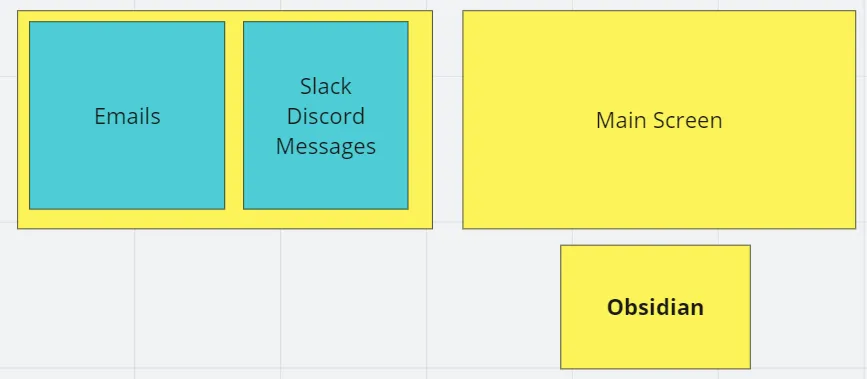
Of course When I work I overlay the relevant windows (Code Editor, Unity Editor, etc…) on the screen that makes the most sense at that time.
Having Obsidian always open is super useful as anytime I have a note to make I’ll write it down in my dairy.
My ShareX is also always active so that I can take a screenshot, GIF or Video using my shortcuts
1ctrl + print : screenshot2Shift + print : video3ctrl + shift + print : GIFObsidian
In case you are not familiar with Obsidian, it is a note taking app.
I had used Obsidian for a few years, but it only really clicked after I saw this video:
After watching this video I started taking daily notes. THis was a game changer. Now everytime I do something or something happens I write them down in my daily note. And if it’s something that needs more context or will become something recurring. Then I write a page for it and link it in my daily note.
I use a few add-ons in my obsidian. Here is a list.
- Calendar by Liam Cain
- Dataview by Micheal Brenan
- Editing Toolbar By Cuman
- Git
- Kanban by mgmeyers
- Reminder by uphy
- Templater by silent void
In addition to taking daily notes I also take Monthly notes for each of my workplaces. As you may know I’m always working on at least 3 projects at a time. So keeping things organized per project is important so that I don’t lose track of where I am on each one.
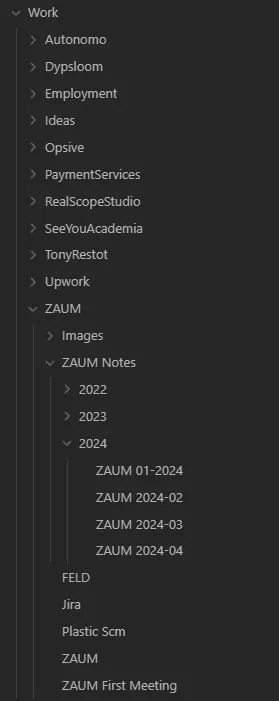
Both for my daily notes and monthly notes I always have some checklist of things to do. And when going to the next day or month I copy paste the check list that are still to do. I do not delte my todo/checklist as I go, I keep them on the page they were completed so it is easy for me to go back to.
If you are interested here is the template for my daily note:
1---2created:3  - <% tp.file.creation_date() %>4tags:5  - daily-note6date: <% moment(tp.file.title,'YYYY-MM-DD-dddd').format('YYYY-MM-DD') %>7---8# <% moment(tp.file.title,'YYYY-MM-DD-dddd').format("dddd, MMMM DD, YYYY") %>9```dataviewjs10const DAILY_NOTES = dv.pages('"Daily Notes" and #daily-note');11const TODAY_DATE = dv.current().date;12const PREV_NOTE = DAILY_NOTES13  .where(note => note.date < TODAY_DATE)14  .sort(note => note.date, 'desc')15  .limit(1)[0];16const NEXT_NOTE = DAILY_NOTES17  .where(note => note.date > TODAY_DATE)18  .sort(note => note.date, 'asc')19  .limit(1)[0];20const PREV = PREV_NOTE ? `[[${PREV_NOTE.file.name}|Previous]]` : 'None';21const NEXT = NEXT_NOTE ? `[[${NEXT_NOTE.file.name}|Next]]` : 'None';22dv.paragraph(`<< ${PREV} | ${NEXT} >>`);23```24
25---26# ✅ TODO27- [ ] Check Google Calendar28- [ ] Check Trello29- [ ] Check Work Forum30- [ ] Check Work Tasks31- [ ] <% tp.file.cursor() %>32- [ ] Add time to tasks33- [ ] Ctrl+P Backup at the end of the day34
35
36---37# 📝 Notes38-39
40
41---42### 📅 Daily Questions43
44###### 🍔 What did I have to eat and drink today45- Lunch:46- Dinner:47
48 ###### 💊 How did I feel today49-50
51##### 🙌 One thing I'm excited about right now is...52-53
54##### 👎 One thing I'm struggling with today is...55-56
57
58---59### Notes created today60```dataview61List FROM "" WHERE file.cday = date("<% moment(tp.file.title,'YYYY-MM-DD-dddd').format("YYYY-MM-DD") %>") SORT file.ctime asc62```63
64### Notes last touched today65```dataview66List FROM "" WHERE file.mday = date("<% moment(tp.file.title,'YYYY-MM-DD-dddd').format("YYYY-MM-DD") %>") SORT file.mtime asc67```
Obsidian is really good for taking notes and keeping track of my life, but it’s not something I share with other people. I do keep a copy on Git so that I can easily persist my notes between my PC and laptop.
When working with other people I usually use Trello and Miro.
Trello
Trello is pretty famous at this point. It’s a Kanban app.
I use Trello mainly to keep track of three things:
- take note of something that I don’t want to forget while I’m not on my PC
- For long term tasks/goals
- Working with other people so we can keep up with each others task progress
Most of the time the information in my Trellos are also in Obsidian in some form or another. Since I don’t use Obsidian on my phone, when outside I take all my notes in Trello. When I come back home to my PC I put all the information in Obsidian
Miro
Miro is a white board app. It is incredibly useful for brainstorming and sharing ideas with others.
Whenever I start a new project, the first thing I do is create a Miro board for it and start writing down anything that comes to mind, adding reference images, youtube videos, etc…
Google Drive & Google Calendar
I don’t think I need to explain those, they are pretty self-explanotary.
I mainly use Google drive as a way to share big files to clients and partners.
Share X
There are many screenshot/gif taking apps for windows. But the one I prefer is ShareX. It is super complete with a ton of features and very versatile. I can super quickly make a screenshot and add pointers, boxes, text, etc… to explain something to someone quickly.
My ShareX is also always active so that I can take a screenshot, GIF or Video using my shortcuts
1ctrl + print : screenshot2Shift + print : video3ctrl + shift + print : GIFImages
Example Image with quick edits (Ctrl + Print):
GIFs
And you can take GIFs, Althought there is no Gif editor (Ctrl + Shift + Print)

Video
You can record videos (Shift+Print):